
If the Reporting Add-In is set up, your colleagues will have the opportunity to report any email they deem could be Phishing using the Moxso report button.
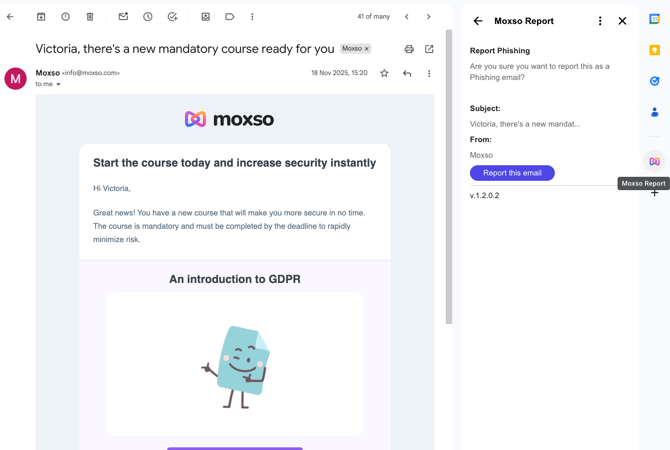
In Gmail it looks like this:
In Outlook it looks like this: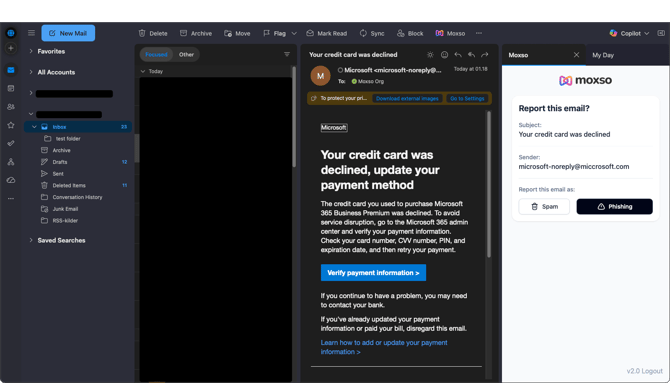
When an employee clicks on the report button:
- The employee is shown some details about the e-mail
- If they still believe that it's phishing, they can click on "Report this email" (google)/Phishing (Outlook).
- The e-mail is then sent to Moxso and we check whether the e-mail has been sent from us in connection with the awareness training
- If the e-mail is from Moxso, the employee earns points
- If the e-mail is not from Moxso, we report it to various e-mail programs, including Gmail and Outlook
- The e-mail is deleted from the employee's inbox
In the Outlook version they can also click on Spam, in which case it will not be sent to the Moxso Threats feature in the admin, but it will simply be deleted so it can be found in their deleted folder.