
Before you begin
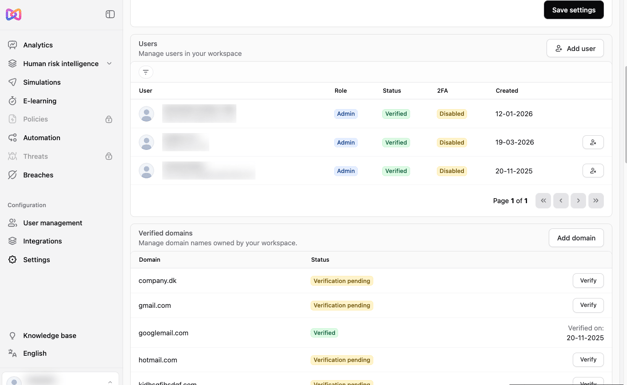
Your colleague's email domain must be added and verified in Moxso before you can invite them. For example, to add anna@example.com, the domain example.com must be verified. If the domain is already verified, go straight to "Add a colleague".
Verify your colleague's email domain
- Go to Settings.
- Scroll down to Domains.
- Check that your colleague's email domain is in the list and is verified.
- If the domain isn't in the list, add it.
- Click Verify. You'll receive an email to complete the verification.
- Open the email and follow the steps to verify the domain.
Add a colleague
- Go to Settings.
- Click Add user.
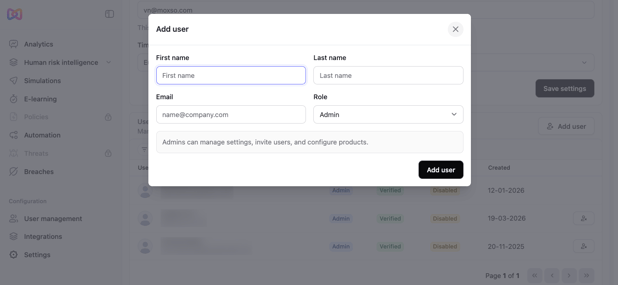
- Fill in your colleague's details.
- Choose a role for your colleague. See "Choose the right role" for the options.
- Click Add user to confirm.
Your colleague receives an email with access to Moxso.
Choose the right role
| Role | Access |
|---|---|
| Admin | Full access to Moxso. |
| Analyst | View access to all data, without the ability to make changes. |
| Threat Analyst | Access to Threat Management, where reported emails are reviewed. |
Tip: Give each colleague the role that matches what they need to do. For instance, a colleague who only reviews reported emails needs the Threat Analyst role, not full Admin access.
If your colleague didn't receive the email
- Ask your colleague to check their spam or junk folder.
- Resend the invitation from Settings.
If the email still doesn't arrive, your email security setup may be blocking Moxso emails. See Why are Moxso emails still blocked, banner-tagged, or missing after I've allowlisted them?