
Note: This guide specifically covers the case where you have launched your first phishing simulation and have not enabled Training or Reporting features. If you would like to learn about how to review your analytics more generally, see our dedicated guide.
Where do I go?
You will need to access the Analytics tab on the left of your Admin and access the Simulation tab at the top.
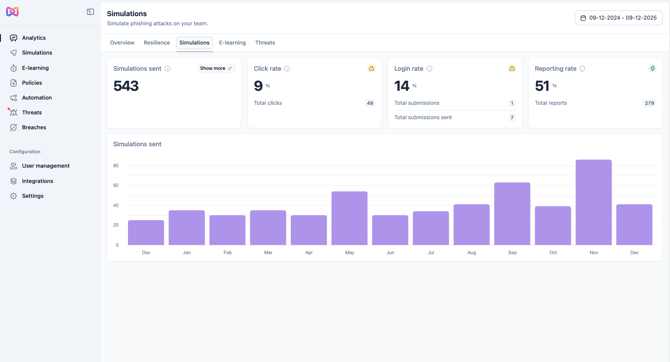
What should I focus on when looking at this initial baseline data?
- How many employees were affected by the Simulation?
- How is the click rate?
- How is the total number of clicks?
- Who are the employees at risk?
What’s next?
No matter how your company reacted to this first round of phishing emails, the important thing to focus on is that you now have a baseline and understanding of the human risk that is present and you can act on it.
In the coming months, as your colleagues go through cybersecurity and awareness training, the numbers coming in will update to reflect this
Now is the time to set up a few things; for each see our relevant guide linked:
- Connect the Reporting add-on. (Available on Understand, Adapt and Defend plans)
- Send internal communication (includes our templates).
- Set up and launch your Training.